 Prayer Guard
A Bible verse widget for your Android home screen
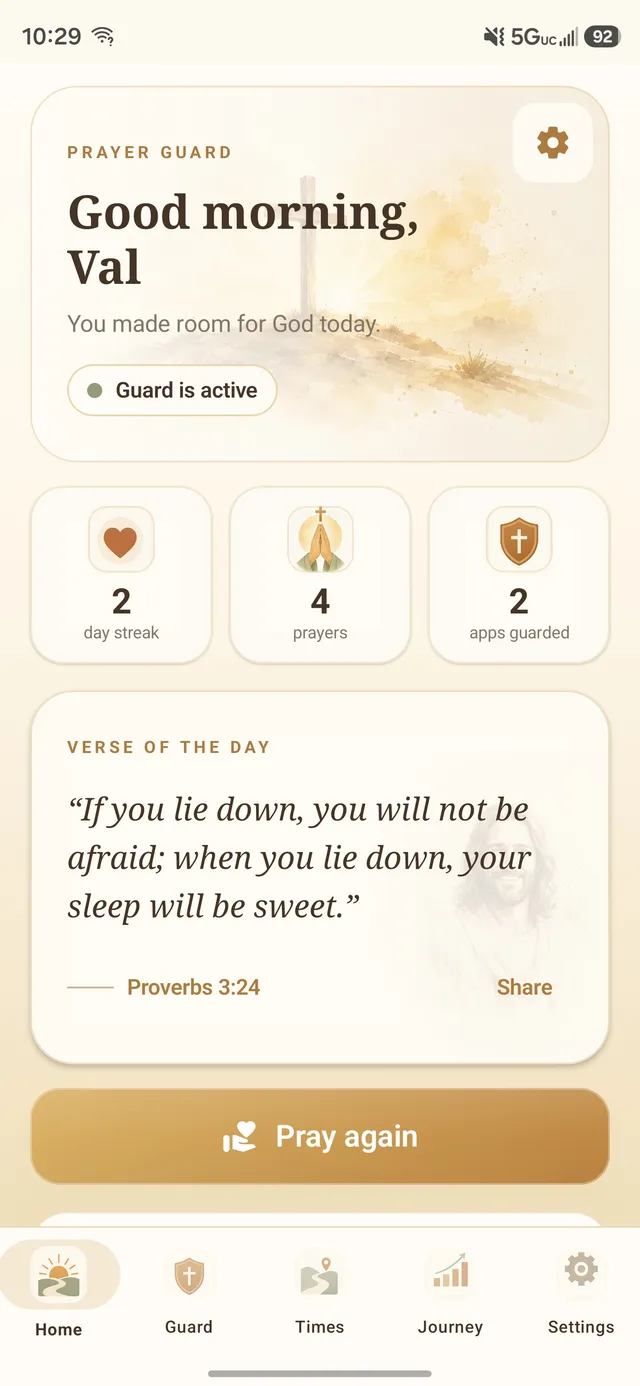
Put Scripture on the screen you see before Instagram, TikTok, YouTube, messages, or anything else. The Prayer Guard widget shows a daily verse and your prayer streak at a glance.
Android · Daily Scripture · Prayer streak · 7-day free trial
Scripture before the app icons get the first word
- Daily Bible verse: a passage from Prayer Guard's library of 257+ Scripture passages and Christian quotes.
- Prayer streak: a visible reminder of the prayer rhythm you are building in Prayer Guard.
- Home-screen placement: Scripture appears before you deliberately open a distracting app.
The widget and app guard solve two different moments
The widget works before you tap an app by putting Scripture on the home screen. Prayer Guard's guard modes work after a selected app is tapped by adding Scripture, a breathing pause, and prayer—or keeping that app closed completely.
Use both when you want the first glance and the first tap to point in the same direction.
How to add the Prayer Guard widget on Android
1. Install Prayer Guard
Download Prayer Guard from Google Play and complete the initial setup.
2. Long-press the home screen
On most Android launchers, long-press an empty area and choose Widgets.
3. Find Prayer Guard
Select the Prayer Guard verse-and-streak widget and place it where you want Scripture visible.
4. Let the widget refresh
The displayed Scripture rotates with the widget's daily content while your Prayer Guard streak stays visible.
Android launcher menus vary by phone manufacturer, so the exact widget-placement wording may differ slightly on your device.
Your prayer content stays local by default
Prayer Guard does not require a Prayer Guard account or maintain a Sevenfold Studio cloud database of your personal prayers or journal entries. Personal content stays local by default. If you want portability, you can create a password-encrypted private backup and save it to a location you choose.
Read Scripture for the exact struggle
For a deeper study beyond the widget, see 40 Bible verses about phone addiction, distraction, and self-control, with a practical application for every passage.
Put the Word where the scroll begins
Try Prayer Guard on Android and add the daily verse widget to your home screen.
Get Prayer Guard on Google Play