 Prayer Guard
A Christian screen time app for Android that puts prayer before the feed
Prayer Guard does not just count minutes. It changes the moment when a distracting app is opened: Scripture appears first, a short breathing pause interrupts autopilot, and prayer gives your attention somewhere better to go.
Android · 7-day free trial · No Prayer Guard account · Personal content stays local by default
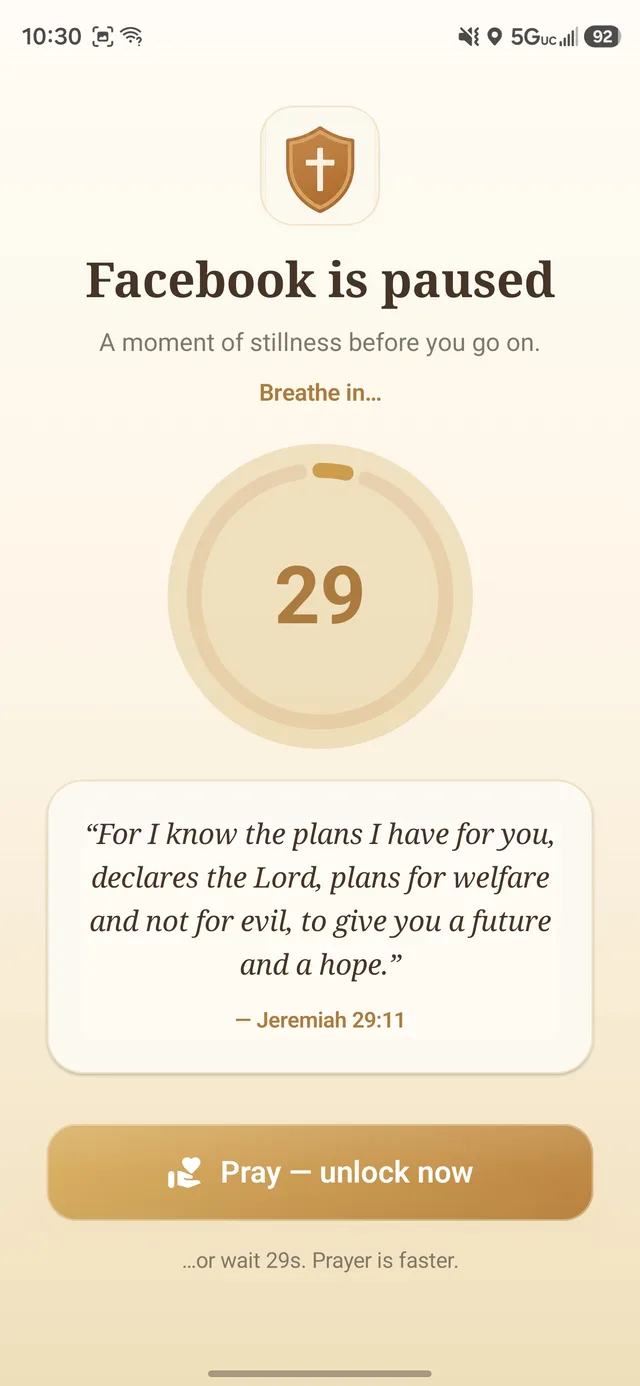
Screen time control with a spiritual direction
A normal screen-time tool can tell you to wait or tell you that a limit is reached. Prayer Guard uses that interruption as a cue to return to God. The goal is not to make every phone use feel guilty; it is to make automatic scrolling less automatic.
1. Scripture interrupts autopilot
When a guarded app opens, Prayer Guard surfaces Scripture before the feed. The interruption is tied to the exact moment the habit normally starts.
2. Prayer replaces empty friction
A short breathing pause and prayer create space to notice why you reached for the app—boredom, anxiety, habit, or a real purpose.
3. You choose the boundary
Different apps need different rules. Set each one to Pause + pray, Pray to open, or Block completely.
Gentle friction when you need it. A closed door when you do not.
- Pause + pray: interrupt the reflex with Scripture and prayer, then make an intentional choice.
- Pray to open: require the prayer step before the guarded app can open.
- Block completely: keep the selected app closed while that mode is active.
These are three distinct behaviors. Prayer Guard does not call a prayer-required unlock a complete block. See the full guard modes explanation.

Use the right tool for the actual struggle
Morning autopilot
Guard social media during the first part of the day and put a Bible verse widget on the home screen so Scripture wins the first glance.
One app that keeps winning
Move that app from Pause + pray to Pray to open—or Block completely during a fast, study period, work block, or bedtime.
When willpower changes its mind
Commitment Lock lets a trusted person hold the PIN to weakening protected settings, with a documented cooldown exit if needed.
Your private prayers do not need to become our database
Prayer Guard does not require a Prayer Guard account or maintain a Sevenfold Studio cloud database of your prayers, journal entries, streaks, or guarded-app settings. Personal content stays on your device by default.
If you want a copy for a new phone or reinstall, you can create a password-encrypted private backup and save it to a location you choose. Sevenfold Studio does not receive the backup file or password.
Current platform
Prayer Guard is currently available for Android. The iPhone version has not launched yet. We would rather state that clearly than show an iOS download button before the app exists.
Looking at other options too? See our Christian app blocker comparison.
Christian screen time questions
What is a Christian screen time app?
It is a screen-time or app-blocking tool that incorporates a Christian practice into the boundary. Prayer Guard uses Scripture, a breathing pause, and prayer before selected Android apps.
Can I use Prayer Guard just for Instagram or TikTok?
Yes. You choose the apps. See the dedicated guides for Instagram, TikTok, YouTube, and Facebook.
Can it keep an app closed instead of letting me pray through?
Yes. Choose Block completely for that app. Pray to open is a different mode: it still permits access, but only after the prayer step.
What Bible verses help with phone addiction?
Start with 1 Corinthians 6:12 on not being mastered, Proverbs 4:23 on guarding the heart, Philippians 4:8 on what fills the mind, and Ephesians 5:15–16 on using time wisely. Our 40-verse guide groups passages by the type of struggle.
Put prayer before the next scroll
Try Prayer Guard on Android for 7 days. Choose the apps, choose the boundary, and let the interruption point somewhere meaningful.
Get Prayer Guard on Google Play