 Prayer Guard
A Christian app blocker for Android that puts prayer before the feed
Choose Instagram, TikTok, YouTube, Facebook, Reddit, games, shopping, news, or another installed app. Prayer Guard can interrupt the open with Scripture and prayer, require prayer before access, or keep the app closed completely.
Android · 7-day free trial · No Prayer Guard account · Personal content local by default
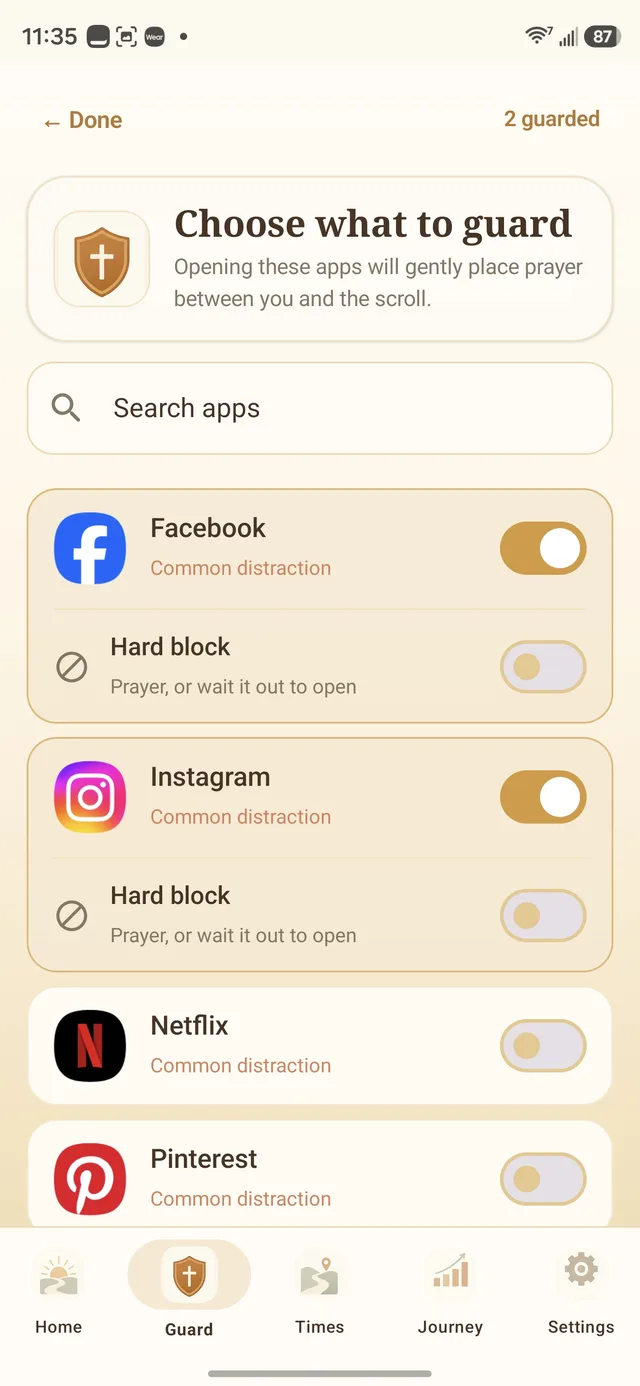
How to block an app on Android with Prayer Guard
1. Install Prayer Guard
Get Prayer Guard from Google Play on your Android phone.
2. Grant the required permission
Prayer Guard needs Android permission to detect when a selected app comes to the foreground so it can display the guard screen. The permission is explained during setup.
3. Choose the apps
Select only the apps that need a boundary. Different apps can use different schedules and opening behaviors.
4. Choose the behavior
Set each app to Pause + pray, Pray to open, or Block completely.
“Pray first” does not have to mean the same thing for every app
Pause + pray
Scripture, breathing, and prayer interrupt the reflex. Afterward, you still make the final choice.
Pray to open
The prayer step is required before the selected app can open. This is stricter than a skippable pause.
Block completely
The selected app stays closed while that mode is active. It does not unlock after prayer.
Prayer Guard complements Digital Wellbeing; it does not pretend it does nothing
Android's built-in Digital Wellbeing can set daily app timers and schedule Focus Mode. Google's current documentation says an app timer closes and dims the app when the daily allowance is used, and the owner can return to settings to change or delete that timer. Focus Mode can pause selected apps and notifications on a schedule, with a temporary “Take a break” option.
Those tools are a good first step if you only need time limits. Prayer Guard is for the person who wants the interruption itself to become Scripture and prayer, with a per-app choice about what happens next.
No fake “unbreakable” claim
A normal Android device owner retains system-level control over the phone. Prayer Guard can add strong friction and accountability inside the app, but it does not claim to make uninstalling or force-stopping impossible.
If the phone belongs to a child and the goal is supervised-device control, consider pairing Prayer Guard with Google Family Link or another appropriate parental-control system.
Protect the settings you chose on a clear-minded day
Commitment Lock lets someone you trust hold the PIN required to weaken protected Prayer Guard settings. You can still make the guard stronger; protected weakening changes require the PIN or the documented 24-hour cooldown.
Your prayer life does not need to become our database
Prayer Guard does not require a Prayer Guard account or maintain a Sevenfold Studio cloud database of your personal prayer content. Data stays local by default. If you want a copy for another device or reinstall, you can create a password-encrypted backup and save it to a location you choose.
Guard the places where your time actually disappears
Block Instagram on Android
Put Scripture and prayer before Reels and the feed—or keep the app closed during a fast.
Block TikTok on Android
Interrupt the reflex before the For You page, require prayer, or block it completely.
Block YouTube on Android
Add friction before Shorts and autoplay while keeping a mode that still works for useful videos.
Also see how to block Facebook on Android.
Android app blocker questions
How do I block apps on Android with Prayer Guard?
Install Prayer Guard, grant the required Android interception permission, choose the apps, and select Pause + pray, Pray to open, or Block completely per app.
How is this different from Digital Wellbeing?
Digital Wellbeing provides built-in daily app timers and Focus Mode. Prayer Guard adds Scripture, prayer, three per-app opening behaviors, schedules, and optional Commitment Lock.
Can Prayer Guard block an app completely?
Yes. Block completely keeps the selected app closed while that mode is active. Pray to open is a separate behavior that still permits access after prayer.
Does Prayer Guard upload my prayers?
Prayer Guard does not require an account or maintain a Sevenfold Studio cloud database of personal prayer content. Personal content stays local by default; optional encrypted backup is saved where you choose.
Make the next app-open intentional
Scripture before scrolling, with the Android boundary each app actually needs.
Try Prayer Guard on Google Play