 Prayer Guard
Block TikTok on Android—or make yourself pray before the For You page
When TikTok opens on autopilot, Prayer Guard can put Scripture and prayer into that exact moment. Choose a gentle pause, prayer-required access, or a complete block for the installed TikTok Android app.
Android · 7-day free trial · No Prayer Guard account · Personal content local by default
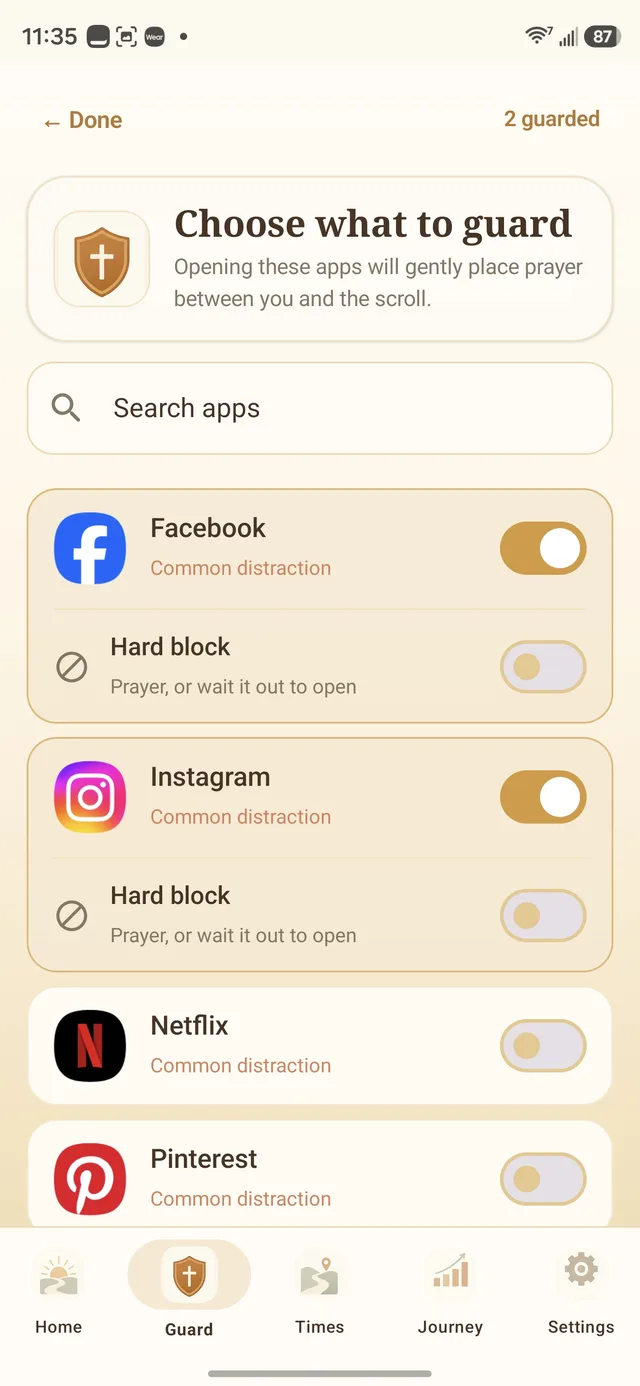
How to block TikTok on Android without deleting it
1. Install Prayer Guard
Get Prayer Guard from Google Play. No Prayer Guard account is required.
2. Enable the guard permission
Prayer Guard explains the Android permission it needs to recognize when the selected TikTok app comes to the foreground.
3. Select TikTok
Choose TikTok from the installed-app list. Add a schedule if the problem is concentrated at bedtime, during work, or in another repeatable window.
4. Choose the boundary
Set TikTok to Pause + pray, Pray to open, or Block completely. The modes are intentionally different.
Choose the lightest TikTok boundary that actually changes the habit
Pause + pray
Scripture, a breathing pause, and prayer interrupt the launch. Afterward, you still make the final choice.
Useful when: you mainly need to notice automatic opens before the For You page takes over.
Pray to open
The prayer step is required before the selected TikTok app can open.
Useful when: a gentle pause is too easy to skip but you still want intentional access to remain possible.
Block completely
The selected TikTok app stays closed while the mode is active; it does not unlock after prayer.
Useful when: you are protecting sleep, work, school, a Sabbath, or a 7-, 21-, or 40-day social media fast.
A timer answers “how long?” Prayer Guard also asks “why now?”
Android Digital Wellbeing can set daily app timers and Focus Mode schedules. TikTok also offers its own screen-time controls. Those tools can be useful, and Prayer Guard does not need to misrepresent them to have a different purpose.
Prayer Guard's difference is that the interruption contains Scripture, a breathing pause, and prayer. The moment becomes an opportunity to ask whether opening TikTok is an intentional choice or simply a cue-response habit.
Protect the hours where TikTok actually wins
If the problem is late-night scrolling, a daytime block may create needless friction. If the problem is opening TikTok before prayer or work, protect the morning. Match the schedule to the pattern you are trying to change.
If you want the decision protected from an impulsive reversal, add Commitment Lock so a trusted person can hold the PIN to weakening protected settings.
Prayer Guard guards the TikTok app, not every web route
The selected rule applies before the installed TikTok Android app opens. It does not automatically block tiktok.com inside Chrome or another browser. If browser access is part of your pattern, account for that route separately.
Prayer Guard also does not claim to make an owner-controlled Android phone literally impossible to bypass. Android still gives the owner system-level controls such as uninstall and force-stop.
Your personal prayer content stays local by default
Prayer Guard does not require an account or maintain a Sevenfold Studio cloud database of your personal prayers and journal entries. Personal content stays local by default. If you want portability, you can create a password-encrypted private backup and save it to a location you choose.
TikTok blocking questions
How do I block TikTok on Android without deleting it?
Install Prayer Guard, enable the required Android guard permission, select TikTok, and choose Block completely. TikTok remains installed while Prayer Guard keeps the selected app closed during that mode.
Can I make myself pray before TikTok opens?
Yes. Use Pray to open when the prayer step should be required before access. Use Pause + pray when you want Scripture and prayer to interrupt the launch while leaving the final choice afterward.
Can I block TikTok only during certain hours?
Yes. Prayer Guard supports guard schedules, so you can apply a stronger TikTok boundary during the parts of the day that matter most.
How is this different from a normal screen-time timer?
A normal timer focuses on minutes. Prayer Guard adds a faith-centered interruption and three different access outcomes: Pause + pray, Pray to open, or Block completely.
Put prayer before the For You page
Choose Pause + pray, Pray to open, or Block completely for TikTok on Android.
Get Prayer Guard on Google Play